HTML preprocessing in ReverseMarkdown: fix the input, not the output
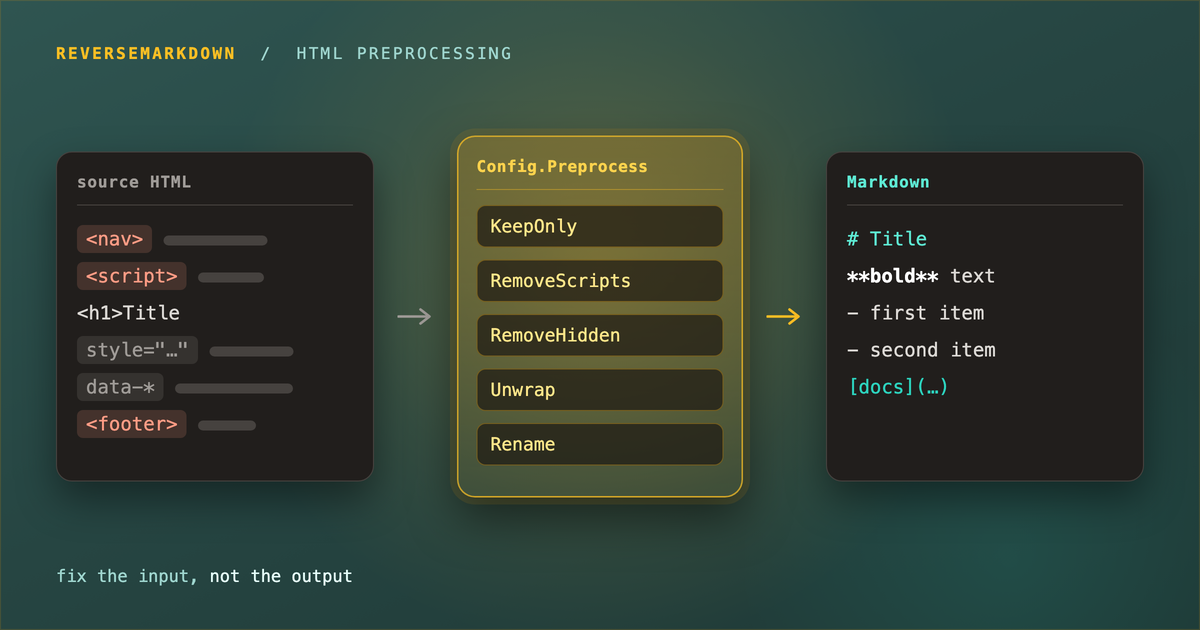
There is a moment familiar to anyone who has converted real HTML to Markdown. The conversion works, technically. It also produces a document whose first three bullet points are the navigation menu, whose footer boilerplate is now a paragraph, and which hides <span style="font-weight:700"> around every phrase that should have been bold. So you write a regex over the output, and then another one, and eventually you own a small pile of string surgery that breaks the moment the source page changes its wrapper divs.
The mistake is fixing the wrong artifact. By the time you are looking at Markdown, the structure that would have told you which paragraph was navigation and which was content is gone. The fix belongs upstream, on the HTML, where a <nav> is still recognisably a <nav>.
That is what ReverseMarkdown 6.2.1 adds: Config.Preprocess, an ordered pipeline of transformations applied to the source HTML before it is read into the Markdown DOM.
source HTML -> [ Preprocess steps ] -> Html filters -> Markdown DOM -> writer -> MarkdownSince v6 the parser is AngleSharp, which means the pipeline is not string manipulation dressed up as an API. Each step operates on a real, browser-grade DOM, with the full CSS selector engine behind it: :has(), :is(), :not(), :nth-child() and the rest. What you are configuring is closer to a small content-extraction script than a list of find-and-replace rules.
It is worth saying why this shipped now. A library that converts HTML to Markdown has been quietly useful for years, but Markdown has become the format that LLMs read, and suddenly everyone with a pile of HTML has a reason to convert it cleanly. “Convert this page” increasingly means “convert the content of this page, without the navigation, the cookie banner, or three kilobytes of data- attributes, into something worth spending context tokens on.” KeepOnly, RemoveHidden and InlineText cell handling are all answers to that question.
Quick start
Every helper appends a step and returns the pipeline, so calls chain:
var config = new Config();
config.Preprocess
    .RemoveScripts()                        // <script>/<noscript> and on* handlers
    .RemoveStyles()                         // style attributes, <style>, stylesheet <link>
    .Remove("nav, footer, .advertisement")  // drop chrome
    .Unwrap("span, font")                   // keep the text, lose the wrapper
    .Rename("b", "strong")                  // <b> -> <strong>
    .RemoveEmptyElements();                 // collapse leftover empty wrappers

var markdown = new Converter(config).Convert(html);
Six lines, and the class of problems that used to justify a post-processing script is gone.
One thing to internalise before anything else: steps run in the order they were added, and each one sees the result of the previous step. Rename("h1", "h2") followed by Remove("h2") deletes your title. The reverse order does not. The pipeline is a sequence, not a set of declarations, and reading it top to bottom tells you exactly what the document looks like at each point.
Removing content
Remove(selector) is the blunt instrument, and most of the time it is the right one:
var config = new Config();
config.Preprocess.Remove("nav, footer, .advertisement");

new Converter(config).Convert(
    "<nav>menu</nav><p>Body text.</p><footer>fine print</footer>");
// Body text.
When the condition outruns what a selector can express, RemoveWhere(predicate) takes a function instead:
var config = new Config();
config.Preprocess.RemoveWhere(e => e.GetAttribute("data-role") == "promo");

new Converter(config).Convert(
    "<p>Real content.</p><p data-role=\"promo\">Buy now!</p>");
// Real content.
KeepOnly(selector) inverts the problem, which for scraped pages is usually the better framing. Rather than enumerating everything you do not want, name the one thing you do:
var config = new Config();
config.Preprocess.KeepOnly("article");

new Converter(config).Convert(
    "<header>site nav</header><article><h1>Title</h1><p>Body.</p></article><footer>end</footer>");
// # Title
//
// Body.
Two details worth knowing. Nested matches are kept via their outermost match rather than duplicated, so KeepOnly("div.card") on nested cards will not emit the inner one twice. And if nothing matches, the document is left untouched: a typo in the selector cannot silently hand you an empty string.
Rounding out the removal helpers, RemoveComments() drops HTML comments from the source (distinct from Formatting.RemoveComments, which works on the output), and RemoveEmptyElements(selector = "p, div, span") clears out the empty wrappers that other steps tend to leave behind. Nested wrappers collapse in a single pass, and elements holding an image, a table or a line break are kept, since those are not actually empty in any way that matters.
Transforming elements
Removal is half the job. The other half is reshaping what survives. Rename changes the tag while keeping attributes and children, Unwrap drops an element but keeps its children, and Wrap goes the other way:
// Rename: fix heading levels on content embedded into a larger document.
var demote = new Config();
demote.Preprocess.Rename("h1", "h2");
new Converter(demote).Convert("<h1>Title</h1>");
// ## Title

// Unwrap: shed a styling wrapper without losing the text inside it.
var unwrap = new Config();
unwrap.Preprocess.Unwrap("span");
new Converter(unwrap).Convert("<p>a <span>b <em>c</em></span> d</p>");
// a b *c* d

// Wrap: promote a styled callout to a real blockquote.
var quote = new Config();
quote.Preprocess.Wrap("p.note", "blockquote");
new Converter(quote).Convert("<p class=\"note\">Remember this.</p>");
// > Remember this.
ReplaceWith swaps the element and its contents for an HTML fragment, and ReplaceWithText swaps it for a text node (escaped like any other text, so it cannot inject markup):
var config = new Config();
config.Preprocess
    .ReplaceWith("div.callout", "<blockquote>Note</blockquote>")
    .ReplaceWithText("img.emoji", ":smile:");
Transform(selector, action) is the per-element escape hatch, handed the live element to do whatever you like with:
var config = new Config();
config.Preprocess.Transform(
    "a[href^='/']",
    a => a.SetAttribute("href", "https://example.com" + a.GetAttribute("href")));

new Converter(config).Convert("<p><a href=\"/docs\">the docs</a></p>");
// [the docs](https://example.com/docs)
And ReplaceText works across the document’s text nodes, ordinal or by Regex:
var config = new Config();
config.Preprocess.ReplaceText("{{name}}", "Jane");
new Converter(config).Convert("<p>Hello {{name}}, welcome back.</p>");
// Hello Jane, welcome back.

var redact = new Config();
redact.Preprocess.ReplaceText(new Regex(@"\d{3}-\d{4}"), "[redacted]");
new Converter(redact).Convert("<p>Call 555-1234 today.</p>");
// Call [redacted] today.
Both overloads skip text inside <script> and <style>, but deliberately not inside <pre>/<code>: a template placeholder in a code sample is usually still a placeholder you want expanded.
Stripping styles, scripts and attributes
These steps run against the whole parsed document, which matters more than it sounds. The HTML5 parser hoists a leading <style> element into <head>, and a step that only walked the body would miss it. These do not.
RemoveStyles()takes everything styling: inlinestyleattributes,<style>elements, stylesheet<link>elements.RemoveInlineStyles(selector = "*")andRemoveStyleSheets()split that into its two halves when you want only one.RemoveScripts()removes<script>and<noscript>plus inlineon*event handlers.RemoveAttributes(selector, params names)removes named attributes, where a trailing*is a prefix match:
var config = new Config();
config.Preprocess.RemoveAttributes("*", "data-*", "id");

new Converter(config).Preprocess(
    "<p id=\"lead\" data-track=\"1\" class=\"intro\">Text.</p>");
// <p class="intro">Text.</p>
RemoveClasses comes with one gotcha worth calling out, because it is the kind of thing you discover three days later in a diff. Fenced code block languages are detected from classes like language-cs, so stripping every class strips your syntax highlighting. Scope it:
// Spare <pre>/<code>: fenced code block languages are detected from their classes.
var config = new Config();
config.Preprocess.RemoveClasses(":not(pre):not(code)");
Recovering formatting that only exists as CSS
This is the pipeline’s most quietly useful trick. Word, Outlook and Google Docs exports do not emit <strong>. They emit <span style="font-weight:700">, and every converter that only understands semantic tags throws that formatting away, silently and completely.
ConvertInlineStylesToTags() promotes it back before conversion sees it. A bold font-weight becomes <strong>, an italic font-style becomes <em>, a line-through text-decoration becomes <del>:
var config = new Config();
config.Preprocess
    .ConvertInlineStylesToTags()
    .Unwrap("span");

new Converter(config).Convert(
    "<p><span style=\"font-weight:700\">bold</span> and " +
    "<span style=\"font-style:italic\">italic</span></p>");
// **bold** and *italic*
It strips only the declarations it consumes, so it is idempotent and leaves color and margin alone. Pairing it with Unwrap sheds the wrappers once they have done their job, which is why those two steps almost always appear together.
Its natural companion is RemoveHidden(), which drops elements hidden by an inline display: none / visibility: hidden or the hidden attribute. Email preheader text is the classic case: invisible in the client, and cheerfully converted to a first paragraph by every naive converter.
var config = new Config();
config.Preprocess
    .RemoveHidden()                 // display:none / visibility:hidden / hidden
    .ConvertInlineStylesToTags()    // font-weight:700 -> <strong>
    .Unwrap("span, font");          // shed the now-meaningless wrappers
For your own steps, the InlineStyle helper exposes the same reading primitives: Get, Has, IsBold, IsItalic, IsStruckThrough and IsHidden. It parses the style attribute properly, including the awkward case of separators inside values such as url(data:image/png;base64,...).
var config = new Config();
config.Preprocess.RemoveWhere(e => InlineStyle.Get(e, "color") == "red");
Reading the cascade, if you really need it
Everything above reads the style attribute only. A rule living in a <style> block or an external sheet needs the actual CSS cascade, which AngleSharp keeps in a separate AngleSharp.Css package.
ReverseMarkdown deliberately does not depend on it. It adds no selector power that AngleSharp’s core does not already have, and it introduces Activator.CreateInstance trim warnings that would end the library’s Native AOT guarantee. That is a trade the library declines to make on your behalf, but you can opt in yourself by handing the converter a CSS-enabled browsing context:
var context = BrowsingContext.New(Configuration.Default.WithCss());

var config = new Config();
config.Preprocess
    .Transform("span", span =>
    {
        if (span.ComputeCurrentStyle().GetPropertyValue("font-weight") is "bold" or "700")
        {
            span.InnerHtml = $"<strong>{span.InnerHtml}</strong>";
        }
    })
    .RemoveStyleSheets()
    .Unwrap("span");

var markdown = new Converter(config, context).Convert(
    """
    <style>.bold { font-weight: bold }</style>
    <p>plain <span class="bold">cascaded bold</span> here</p>
    """);
// plain **cascaded bold** here
WARNING
Order is load-bearing here. <head> computes to display: none, and <head> holds the stylesheets. A predicate like RemoveWhere(e => e.ComputeCurrentStyle().GetPropertyValue("display") == "none") would therefore target <head> and destroy the cascade for every later step. The built-in removal steps never detach <html>, <head> or <body>, so this particular case is safe, but the general rule stands: read computed styles before you remove hidden content. Also note that AngleSharp will fetch external resources if your configuration registers a requester, and a shared browsing context is not guaranteed safe for concurrent parsing.
Table cells, and the CKEditor problem
A nested list or table inside a <td> has no Markdown representation. GitHub Flavored Markdown tables hold simple inline content, and emitting a real list inside a cell breaks the table. ReverseMarkdown therefore keeps those elements as HTML, and Tables.CellListHandling decides what that HTML looks like.
The default, RawHtml, copies the source verbatim. Faithful, but it brings along every class, inline style and editor wrapper. Output from CKEditor, SharePoint or Word leaves a cell looking like this:
<ol class="customList"><li><p class="noSpacing" data-text-type="noSpacing">
<span style="font-size:17px" data-fontsize="17px">First point</span></p></li></ol>
CleanHtml keeps the list as a real list and strips the markup that means nothing without the source stylesheet:
var config = new Config
{
    Tables = { CellListHandling = Config.TableCellListHandlingOption.CleanHtml },
};

new Converter(config).Convert(
    "<table><tr><th>Steps</th></tr><tr><td>" +
    "<ol class=\"customList\"><li><p class=\"noSpacing\">" +
    "<span style=\"font-size:17px\">Submit the request</span></p></li></ol></td></tr></table>");
// | Steps |
// | --- |
// | <ol><li>Submit the request</li></ol> |
InlineText takes the other road, rendering the list as inline text with one item per line separated by <br>, each prefixed with its bullet or number and its content converted to Markdown:
var config = new Config
{
    Tables = { CellListHandling = Config.TableCellListHandlingOption.InlineText },
};

new Converter(config).Convert(
    "<table><tr><th>Steps</th></tr><tr><td>" +
    "<ol><li><strong>Submit</strong> the request</li><li>Wait for approval</li></ol>" +
    "</td></tr></table>");
// | Steps |
// | --- |
// | 1. **Submit** the request<br>2. Wait for approval |
That leaves no HTML in the output at all, which is exactly what you want for Markdown that gets read rather than rendered: RAG indexing, LLM prompts, plain-text diffing. It is lossy by design. The list stops being a list, and nested lists flatten to one level. Nested <table> elements are left as HTML, because flattening a table to text loses its shape entirely.
NOTE
CleanHtml is usually what you want, and it is a candidate for becoming the default in the next major version. It stays opt-in for now because it changes existing output.
The same cleanup is available as a preprocessing step, SimplifyTableCellHtml(), for when you want it to reach content the option does not touch, or to combine it with other steps:
var config = new Config();
config.Preprocess.SimplifyTableCellHtml();

new Converter(config).Convert(
    "<table><tr><th>Policy</th></tr><tr><td>" +
    "<ol class=\"customList\"><li><p class=\"noSpacing\">" +
    "<span style=\"font-size:17px\">First point</span></p></li>" +
    "<li><p><span style=\"font-size:17px\">Second point</span></p></li></ol>" +
    "</td></tr></table>");
// | Policy |
// | --- |
// | <ol><li>First point</li><li>Second point</li></ol> |
And because preprocessing runs first, any general helper can be scoped to cells with a descendant selector when you want a different trade-off:
var config = new Config();
config.Preprocess
    .Unwrap("td span, th span")
    .RemoveAttributes("td *, th *", "class", "style", "data-*");
The rule of thumb: CleanHtml if the Markdown gets rendered, InlineText if it gets read.
Making relative URLs survive the trip
Markdown extracted from a page and stored somewhere else takes its relative links with it, and they point nowhere. ResolveRelativeUrls(baseUrl) fixes href, src and poster:
var config = new Config();
config.Preprocess.ResolveRelativeUrls("https://example.com/guide/index.html");
new Converter(config).Convert(
"<p><a href=\"/docs\">docs</a> and <img src=\"img/a.png\" alt=\"a\"> " +
"and <a href=\"#top\">top</a></p>");
// [docs](https://example.com/docs) and  and [top](#top)Absolute URLs are left alone, as are data: URIs, mailto: links and in-page #anchor references. Protocol-relative //host/path values pick up the base scheme.
Put together, a full extraction pipeline for a scraped page is short enough to read in one go:
var config = new Config();
config.Preprocess
    .KeepOnly("article.post")
    .ResolveRelativeUrls("https://example.com/blog/my-post")
    .ReplaceWith("div.callout", "<blockquote>Note</blockquote>")
    .ReplaceWithText("img.emoji", ":smile:");
When the built-ins run out
Nothing here is a closed set, and the escape hatches come in increasing order of power.
Transform for per-element work, and Add(name, step) for a whole-document step that receives the <html> element:
var config = new Config();
config.Preprocess.Add("drop-empty-tables", root =>
{
    foreach (var table in root.QuerySelectorAll("table").ToList())
    {
        if (table.QuerySelector("td, th") is null)
        {
            table.Remove();
        }
    }
});
For something reusable, implement IHtmlPreprocessStep and hand an instance to Add:
public sealed class UppercaseHeadings : IHtmlPreprocessStep
{
    public void Apply(IElement root)
    {
        foreach (var heading in root.QuerySelectorAll("h1, h2, h3"))
        {
            heading.TextContent = heading.TextContent.ToUpperInvariant();
        }
    }
}

var config = new Config();
config.Preprocess.Add(new UppercaseHeadings());
And when the transformation genuinely has to happen before parsing, because a DOM step cannot fix markup the parser has already reinterpreted, AddText runs against the raw HTML with line endings normalised to \n:
var config = new Config();
config.Preprocess
    .AddText("expand-template", html => html.Replace("{{name}}", "Jane"))
    .Remove("nav");   // DOM step, still sees the expanded markup
Note the one ordering exception in the whole pipeline: all text steps run before all DOM steps, regardless of the order you added them. That is the only sensible arrangement, since a text step rewrites the markup the DOM steps are built from, but it is worth knowing rather than discovering. Prefer DOM steps for anything structural. They are safer and they say what they mean.
Custom steps get the live AngleSharp DOM with nothing held back, so there is no transformation the pipeline can refuse. There is exactly one rule the converter enforces: leave <html>, <head> and <body> in the document and remove their contents instead. The built-in steps already honour this, and a custom step that detaches them fails with an explanation rather than a NullReferenceException several frames away.
The pipeline itself is inspectable and resettable through Steps, TextSteps, Count and Clear().
Debugging a pipeline
The obvious question, once you have six steps chained together and the output is wrong, is which step did it. Converter.Preprocess(html) returns the transformed HTML without converting it:
var config = new Config();
config.Preprocess.RemoveScripts().Remove("nav");

// The transformed HTML, without converting it.
var cleaned = new Converter(config).Preprocess(html);
Comment out steps, run it again, see what changed. It also doubles as a caching primitive when you preprocess once and convert to several flavors, and it returns the input unchanged when no steps are configured.
Things worth knowing
Two behaviours are easier to read once than debug later. Steps run before the Html filters (Html.ExcludeSelectors and Html.ElementFilters), which remain supported and are effectively narrower versions of Remove and RemoveWhere. And custom steps and predicates must be thread-safe if you share a converter across threads, since the pipeline is configured once and then applied on every conversion.
The full reference, with a worked example for every helper plus the finer points about Parse, per-flavor raw HTML handling, and the Native AOT guarantee, is at mysticmind.github.io/reversemarkdown-net/preprocessing. Every snippet in those docs is compiled from the samples project and asserted by tests, so nothing there can drift from what the code actually produces.
Wrapping up
Somewhere in the middle of building this, ReverseMarkdown crossed 6.4 million downloads on NuGet, up from 3.7M when 5.0.0 shipped in January. Thank you to everyone who has filed an issue, sent a pull request, or just pointed the library at some genuinely deranged HTML and reported what came out. That last one is more valuable than it sounds.
- Release: 6.2.1
- Docs: mysticmind.github.io/reversemarkdown-net
- Source: github.com/mysticmind/reversemarkdown-net
- NuGet:
dotnet add package ReverseMarkdown